Python VS R Latest Trend in the Market


Basic Understanding:
        Day by Day we are going ahead where we are facing big data, it is critical to handle and visualize it in appropriate manner. Different programming languages handles different kind of problem such as (C++, C#) for desktop application, mobile application, web base application, but in the domain of programming language R and Python are old languages R designed on August 1993; and Python in 1991 but its impressive libraries emphases us to use it for big data (analysis, and predication) where we need to predict and visualization using Artificial Intelligence, machine learning, deep learning also for Data Science (statistical purpose).
In the usage war, both programming language waging each other, action, rule and predication action these two has own importance according to the modern era both language ratio in usage, in 2017 R highlighted in the world by its usage and it unique libraries.


Introduction:
For statistical calculation and graphic R programming language has been used. The R GNU based, which is similar to S language, where it environment designed at Bell Laboratories (formerly AT&T, now Lucent Technologies) by John Chambers and colleagues. Different designing and it implementation of S can be considered as R. Both not be, same there are many difference between S and R in other work. Also, R bestrew big range of different statistical related modeling, classical statistical test, time s series analysis, classification, clustering function etc…and related graphical techniques, which are nightly extensible, whereas S provide the research statistical methodology, and R provides the open source route to participation in the activity.
For R, it is very easy to formulate the mathematical symbols and drawing the plot using well designed publication. These graphic design by default running possibilities present in window, Unix and related platforms available on it.
R as Programming LanguageIt is the Open source counterpart of SAS, traditionally been used in academics and research. It is open source nature basically, latest techniques get released quickly. There is a lot of documentation available over the internet and it is a very cost-effective option.

Python as Programming Language: It is an open source scripting language as like others,  It is one of the growing language. These days, it stunning libraries (scipy, numpy and matplotlib) and functions for almost any statistical operation / model building you may want to do. Also using of pandas showing the file handing in very smart way for data handing and others related mathematical models work.
R is traditionally open source programming language, which is not only used in data science field but also in different field of life.
           In term of differences and opponent there are a lot of differences between them to shows the grow of that language in the different field in this ear, such as data science, machine learning, data science and data analyst, but In the Article I am going to discuss TEN differences which effect to grow and popularity reason of R and Python in the globe.
Let's understand these differences:


History
    Python is an interpreted high-level programming language for general-purpose programming, which has been created by Guido van Rossum in 1991, The two version (2.0 and 3.0) of python create conflict between the user, and from these two others sub version is going to created time to time (2.7 or 3.2), right now the current latest version (as of Fall 2018) is Python 3.6.4. Whereas in R is a programming language as like other it is free environment for statistical computing and also support for graphic which has been designed by Ross Ihaka and Robert Gentleman in 1995, the latest version of R which is running in market is  3.5.1 which is available on the official website of R to download.
Community
   The main purpose of community to provide help as quick service. There are different community available to provide stunning performance to produce stage as community like on R website community,  Stackoverflow, Mailing list, user contributed code and documentation also different developer and programmer create own community to held it up. Whereas in R community Mailing list, user contributed code and documentation and Active stackoverflow members few data scientist and statisticians also provide the huge community as compare to python which grow more result then python popularity.
Purpose
    Python always force on productivity and code readability and usability because it is an Object oriented language. It is English related keyword supported language (logical operator AND, OR AND NOT). Also not only folks use it to make better programming also use it for gaming by using PyGame library. Whereas in R, it is focus on Data to fix, predict, analysis and deep concept of statistic and graphic model for graph related plotting.
Usability
    As we discuss about the syntax of Python for coding is easy because several keyword and writing tool related to English easy word, that’s why running and debugging is easy. Also, Indentation of code effect on it meaning, we must follow the pattern of python in term writing function (in the predefine way). Where as in R statistic related model can be written in few lines. Also, function can be written using several way as compare to python. R is generally suitable for any type of data analysis. The numerous number of packages and readily usable tests make starting any analysis quite easy as computer to python.
Flexibility
          In term of flexibility of python, it is more flexibility, we do new any time on it which is never did on before. Many user use it as scripting language also for web development. Python use to analysis project is part of a bigger project that involves many complexities easily. Where as in R, for data science in deep many developer prefer to use R then Python due to its powerful libraries also helpful to analysis complex data using huge list of R packages and statistical model.
Ease of learning
         In the field of computer programming, many developer prefer to build their logic first, for this many computer scientist to learn first Python, that’s why in different educational centers python has been taught as level first. For ease in the python learning, readability and usability make it easier for basic and easy to learn as compare to R. But also R is not hard for experience programmer.
Job Scenario
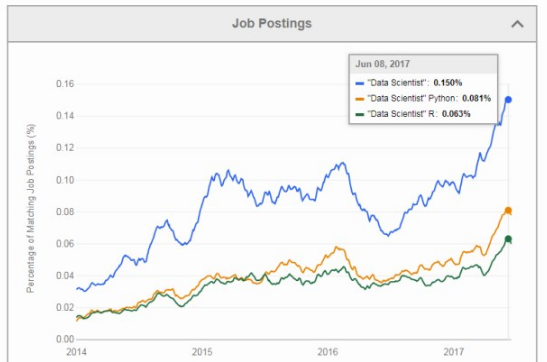
        According to the latest trends and report, R and Python are the competitive to each other, Last TWO Year the Popularity of Python is grow up then R, but we cannot ignore the popularity of R as well. Most of the companies follow the usage of R and python both for big data handling and data analysis. Accordingly the jobs setup change time to time in term of salary and also work on.
The jobs, ad in USA in 2017, through the website have a look!
Search by "Data Scientist" finds 3,558 jobs
Search by "Data Scientist" Python finds 2,407 jobs (68% of all)
Search by "Data Scientist" R finds 2,179 (61% of all).
Search by "Data Scientist" Python R finds 1,906 jobs (54% of all) and
Search for "Data Scientist" -Python -R finds 892 jobs (25% of all)
Also, the job and salaries graphs demonstrate this senses is easy way: The first one is showing the popularity of Python over R, second for Python as data science also third one shows for the same in ratio in June of 2017.



Data Handling
           For data handling I do not see any big differences between them which shows the realist effect on any programming language. Both handle the data by using libraries, Python use Numpy and Pandas to cover and handle the data in easy and sufficient way, whereas in R we do not need to install libraries for basic data handling but for big data and other advance work we need to install it like data.table and dplyr and others.
IDE support
        IDE means integrated development environment, for support of programming language coding and environment to run we need IDE according the related programming language like C/C++ Dev, C# Visual Studio. As like these For Python there are different IDE to code few of them which are most famous these days, Pycham, IPython Notebook, Spyder and Rodeo, where as in R the famous one is only RStudio.
Libraries
         Library is the collection of classes which provide the short way to code and get to required output using few line of code. In Python there are different libraries in this Article we will discuss main and famous of them, Pandas which is used to manipulate the date, Scipy and Numpy are used for scientific work and calculation. For graph we used matplotlib, and using statsmodels we explore the data, create the statistical modem and also perform different statistical test and unit test. Whereas in R different packages play a vital rule to make R more attractive in term of usage, dplyr, plyr and data.table are used to manipulate the date as like python, stringr is used to manipulate the string. Zoo not for (zoo) J but for working in regular and irregular time series. Ggvis, lattice and ggplot2 are used to visualize the date and caret for working on machine learning.

These all are the few differences which I observed
in the field and working by Research!
I am hopeful it will be informative for all of you!!!

Python VS R Latest Trend in the Market


Basic Understanding:
        Day by Day we are going ahead where we are facing big data, it is critical to handle and visualize it in appropriate manner. Different programming languages handles different kind of problem such as (C++, C#) for desktop application, mobile application, web base application, but in the domain of programming language R and Python are old languages R designed on August 1993; and Python in 1991 but its impressive libraries emphases us to use it for big data (analysis, and predication) where we need to predict and visualization using Artificial Intelligence, machine learning, deep learning also for Data Science (statistical purpose).
In the usage war, both programming language waging each other, action, rule and predication action these two has own importance according to the modern era both language ratio in usage, in 2017 R highlighted in the world by its usage and it unique libraries.


Introduction:
For statistical calculation and graphic R programming language has been used. The R GNU based, which is similar to S language, where it environment designed at Bell Laboratories (formerly AT&T, now Lucent Technologies) by John Chambers and colleagues. Different designing and it implementation of S can be considered as R. Both not be, same there are many difference between S and R in other work. Also, R bestrew big range of different statistical related modeling, classical statistical test, time s series analysis, classification, clustering function etc…and related graphical techniques, which are nightly extensible, whereas S provide the research statistical methodology, and R provides the open source route to participation in the activity.
For R, it is very easy to formulate the mathematical symbols and drawing the plot using well designed publication. These graphic design by default running possibilities present in window, Unix and related platforms available on it.
R as Programming LanguageIt is the Open source counterpart of SAS, traditionally been used in academics and research. It is open source nature basically, latest techniques get released quickly. There is a lot of documentation available over the internet and it is a very cost-effective option.

Python as Programming Language: It is an open source scripting language as like others,  It is one of the growing language. These days, it stunning libraries (scipy, numpy and matplotlib) and functions for almost any statistical operation / model building you may want to do. Also using of pandas showing the file handing in very smart way for data handing and others related mathematical models work.
R is traditionally open source programming language, which is not only used in data science field but also in different field of life.
           In term of differences and opponent there are a lot of differences between them to shows the grow of that language in the different field in this ear, such as data science, machine learning, data science and data analyst, but In the Article I am going to discuss TEN differences which effect to grow and popularity reason of R and Python in the globe.
Let's understand these differences:


History
    Python is an interpreted high-level programming language for general-purpose programming, which has been created by Guido van Rossum in 1991, The two version (2.0 and 3.0) of python create conflict between the user, and from these two others sub version is going to created time to time (2.7 or 3.2), right now the current latest version (as of Fall 2018) is Python 3.6.4. Whereas in R is a programming language as like other it is free environment for statistical computing and also support for graphic which has been designed by Ross Ihaka and Robert Gentleman in 1995, the latest version of R which is running in market is  3.5.1 which is available on the official website of R to download.
Community
   The main purpose of community to provide help as quick service. There are different community available to provide stunning performance to produce stage as community like on R website community,  Stackoverflow, Mailing list, user contributed code and documentation also different developer and programmer create own community to held it up. Whereas in R community Mailing list, user contributed code and documentation and Active stackoverflow members few data scientist and statisticians also provide the huge community as compare to python which grow more result then python popularity.
Purpose
    Python always force on productivity and code readability and usability because it is an Object oriented language. It is English related keyword supported language (logical operator AND, OR AND NOT). Also not only folks use it to make better programming also use it for gaming by using PyGame library. Whereas in R, it is focus on Data to fix, predict, analysis and deep concept of statistic and graphic model for graph related plotting.
Usability
    As we discuss about the syntax of Python for coding is easy because several keyword and writing tool related to English easy word, that’s why running and debugging is easy. Also, Indentation of code effect on it meaning, we must follow the pattern of python in term writing function (in the predefine way). Where as in R statistic related model can be written in few lines. Also, function can be written using several way as compare to python. R is generally suitable for any type of data analysis. The numerous number of packages and readily usable tests make starting any analysis quite easy as computer to python.
Flexibility
          In term of flexibility of python, it is more flexibility, we do new any time on it which is never did on before. Many user use it as scripting language also for web development. Python use to analysis project is part of a bigger project that involves many complexities easily. Where as in R, for data science in deep many developer prefer to use R then Python due to its powerful libraries also helpful to analysis complex data using huge list of R packages and statistical model.
Ease of learning
         In the field of computer programming, many developer prefer to build their logic first, for this many computer scientist to learn first Python, that’s why in different educational centers python has been taught as level first. For ease in the python learning, readability and usability make it easier for basic and easy to learn as compare to R. But also R is not hard for experience programmer.
Job Scenario
        According to the latest trends and report, R and Python are the competitive to each other, Last TWO Year the Popularity of Python is grow up then R, but we cannot ignore the popularity of R as well. Most of the companies follow the usage of R and python both for big data handling and data analysis. Accordingly the jobs setup change time to time in term of salary and also work on.
The jobs, ad in USA in 2017, through the website have a look!
Search by "Data Scientist" finds 3,558 jobs
Search by "Data Scientist" Python finds 2,407 jobs (68% of all)
Search by "Data Scientist" R finds 2,179 (61% of all).
Search by "Data Scientist" Python R finds 1,906 jobs (54% of all) and
Search for "Data Scientist" -Python -R finds 892 jobs (25% of all)
Also, the job and salaries graphs demonstrate this senses is easy way: The first one is showing the popularity of Python over R, second for Python as data science also third one shows for the same in ratio in June of 2017.


Data Handling
           For data handling I do not see any big differences between them which shows the realist effect on any programming language. Both handle the data by using libraries, Python use Numpy and Pandas to cover and handle the data in easy and sufficient way, whereas in R we do not need to install libraries for basic data handling but for big data and other advance work we need to install it like data.table and dplyr and others.
IDE support
        IDE means integrated development environment, for support of programming language coding and environment to run we need IDE according the related programming language like C/C++ Dev, C# Visual Studio. As like these For Python there are different IDE to code few of them which are most famous these days, Pycham, IPython Notebook, Spyder and Rodeo, where as in R the famous one is only RStudio.
Libraries
         Library is the collection of classes which provide the short way to code and get to required output using few line of code. In Python there are different libraries in this Article we will discuss main and famous of them, Pandas which is used to manipulate the date, Scipy and Numpy are used for scientific work and calculation. For graph we used matplotlib, and using statsmodels we explore the data, create the statistical modem and also perform different statistical test and unit test. Whereas in R different packages play a vital rule to make R more attractive in term of usage, dplyr, plyr and data.table are used to manipulate the date as like python, stringr is used to manipulate the string. Zoo not for (zoo) J but for working in regular and irregular time series. Ggvis, lattice and ggplot2 are used to visualize the date and caret for working on machine learning.

These all are the few differences which I observed
in the field and working by Research!
I am hopeful it will be informative for all of you!!!

Diseases Identification (Cancer) using Deep Learning (Keras library)

Hi, As I mention in the previous Article Understand about Keras,
 now in this Article we will understand about the Keras library
 work how does it work and how does is it install on your
machine, in a Project name by
Cancer Classification using Deep learning (Keras).

Classification Concept:

         Classification work on identification by using deep learning concept. For example by picture we can identify the gender similarly by picture we can identify the person is happy, normal or sad!!! The concept of classification we want to use on cancer disease using DNA dataset. In this Article, I predict by using deep learning (Keras library) the patient has cancer or not through it DNA dataset or gene. For this DNA data set download form www.Kaggle.com, in the data set the feature expectation through the gene (gene_1 to gene_49) including the five classes namely (BRCA, KIRC, COAD, LUAD, PRAD). By using these gene order and classes this project’s Article predict about the cancer is active or not.

       For implementation Python is the better choice, either R can be an alternative choice. I used also jupyter notebook for coding as well. But first we need to install KERAS for data handling which is deep learning library which I separately publish my Article on it, if you did not read you need to read it first Understandingabout Keras. Now the installation process should be like

$ pip install keras
Similarity for jupyter notebook installation,
$ jupyter notebook

       Now, move towards the working on Project using Keras, the coding of project as like this:

from keras.models import Sequential
from keras.layers import Dense
import numpy

        We will use numpy (library) to load data - there are septrients from data columns
To load the data we need to use NUMPY library, for separation we use delimiter, code will be like;

dataset = numpy.loadtxt("DNA_Dataset.csv", delimiter=’,’)

       As we know about the deep learning Data training, divide the existing data into two part TRAINING DATA AND TESTING DATA, the exist record consist on 391Rows * 44Columns. Separate 70% date for Training and 30% for Testing.

X = dataset[:274,0:8]
Y = dataset[:274,8]
X_test = dataset[274:,0:8]
Y_test = dataset[274:,8]

       Now, we will move towards Keras model for this we will use Dense and in this Dense the quantity of INPUT and HIDDEN nodes can be inserted.

model = Sequential()
model.add(Dense(12, input_dim=8, init='uniform', activation='relu'))
model.add(Dense(8, init='uniform', activation='relu'))
model.add(Dense(1, init='uniform', activation='sigmoid'))

       At that point we need to create different layer there are 4 Layers but it is depend on your problem for identification. In the first line it is an input layer which is consist on x nodes (depend on features which is define before gene 1 to 49also classes of identification namely (BRCA, KIRC, COAD, LUAD, PRAD)), then Hidden layer consist on 12 nodes (may be vary). Then we will create another Hidden layer on which 8 nodes exist. At last there is an output layer on which 1 node exit signed Sigmoid of its Activation Function because the problem is BINARY CLASSIFICATION.
Now, it time to compile the model.

model.compile(loss='binary_crossentropy',optimizer='adam',metrics=['accuracy'])

   We chose binary cross entropy for the loss function as it is based on the Binary classification - we will call fit to start training.

model.fit(X, Y, nb_epoch=150, batch_size=10,  verbose=2)

      We got fit data and labels - with this number of epoch or iteration kept 150 - via batch size we told that gradient descent will update weights after ten inputs - in the next step we examined the test data on next level.

scores = model.evaluate(X_test, Y_test)
print("\n%s:%.2f%%"% (model.metrics_names[1], scores[1]*100))

Result:

      We got between (70% to 75%) result accuracy, here in this project 74.35% got to predict the Cancer disease is active or not in the patient using DNA data set (gene) using 5 classes.

I am hopeful it will be very helpful for you understand the working of 
Keras in Project base work To download the exist data set which is
used in this project ClickToDownlaod. 

Diseases Identification (Cancer) using Deep Learning (Keras library)

Hi, As I mention in the previous Article Understand about Keras,
 now in this Article we will understand about the Keras library
 work how does it work and how does is it install on your
machine, in a Project name by
Cancer Classification using Deep learning (Keras).

Classification Concept:

         Classification work on identification by using deep learning concept. For example by picture we can identify the gender similarly by picture we can identify the person is happy, normal or sad!!! The concept of classification we want to use on cancer disease using DNA dataset. In this Article, I predict by using deep learning (Keras library) the patient has cancer or not through it DNA dataset or gene. For this DNA data set download form www.Kaggle.com, in the data set the feature expectation through the gene (gene_1 to gene_49) including the five classes namely (BRCA, KIRC, COAD, LUAD, PRAD). By using these gene order and classes this project’s Article predict about the cancer is active or not.

       For implementation Python is the better choice, either R can be an alternative choice. I used also jupyter notebook for coding as well. But first we need to install KERAS for data handling which is deep learning library which I separately publish my Article on it, if you did not read you need to read it first Understandingabout Keras. Now the installation process should be like

$ pip install keras
Similarity for jupyter notebook installation,
$ jupyter notebook

       Now, move towards the working on Project using Keras, the coding of project as like this:

from keras.models import Sequential
from keras.layers import Dense
import numpy

        We will use numpy (library) to load data - there are septrients from data columns
To load the data we need to use NUMPY library, for separation we use delimiter, code will be like;

dataset = numpy.loadtxt("DNA_Dataset.csv", delimiter=’,’)

       As we know about the deep learning Data training, divide the existing data into two part TRAINING DATA AND TESTING DATA, the exist record consist on 391Rows * 44Columns. Separate 70% date for Training and 30% for Testing.

X = dataset[:274,0:8]
Y = dataset[:274,8]
X_test = dataset[274:,0:8]
Y_test = dataset[274:,8]

       Now, we will move towards Keras model for this we will use Dense and in this Dense the quantity of INPUT and HIDDEN nodes can be inserted.

model = Sequential()
model.add(Dense(12, input_dim=8, init='uniform', activation='relu'))
model.add(Dense(8, init='uniform', activation='relu'))
model.add(Dense(1, init='uniform', activation='sigmoid'))

       At that point we need to create different layer there are 4 Layers but it is depend on your problem for identification. In the first line it is an input layer which is consist on x nodes (depend on features which is define before gene 1 to 49 also classes of identification namely (BRCA, KIRC, COAD, LUAD, PRAD)), then Hidden layer consist on 12 nodes (may be vary). Then we will create another Hidden layer on which 8 nodes exist. At last there is an output layer on which 1 node exit signed Sigmoid of its Activation Function because the problem is BINARY CLASSIFICATION.
Now, it time to compile the model.

model.compile(loss='binary_crossentropy',optimizer='adam',metrics=['accuracy'])

   We chose binary cross entropy for the loss function as it is based on the Binary classification - we will call fit to start training.

model.fit(X, Y, nb_epoch=150, batch_size=10,  verbose=2)

      We got fit data and labels - with this number of epoch or iteration kept 150 - via batch size we told that gradient descent will update weights after ten inputs - in the next step we examined the test data on next level.

scores = model.evaluate(X_test, Y_test)
print("\n%s:%.2f%%"% (model.metrics_names[1], scores[1]*100))

Result:

      We got between (70% to 75%) result accuracy, here in this project 74.35% got to predict the Cancer disease is active or not in the patient using DNA data set (gene) using 5 classes.

I am hopeful it will be very helpful for you understand the working of 
Keras in Project base work To download the exist data set which is
used in this project ClickToDownlaod. 

Understanding about KERAS


Hi, everyone! I really believe to express my knowledge in pure and simple words!Today we are going to understand about one of the leading DEEP LEARNING library KERAS. We have already learnt about the deep learning concept, machine learning as well, if you did not read, read it first!


Introduction:
In our daily life, library is greatest way to express knowledge as a silence place, when we see it, we observe that it is source of information, collection of book and in a book a lot of information bound. But do you know what is library in computer programming language domain? It is the collection of classes every class has unique features and according to the need we use it. For example Math class library in C# give us a lot of math function without any code.
In python there are many useful library in deep learning concept but Keras in one of them which is one of the most popular library. So, in this Article we will discuss about KERAS!
What is Keras?

Keras is a Python library for deep learning that can run on top of Theanoor TensorFlow. Another simple definition, Keras is an open source neural network library which is written in Python.
For Deep learning concept we use Keras (Python Library) which run on Theano or TensorFlow. We read and understand the concept of deep learning in DEEP LEARNING post, in term of work this library play a vital role. This was made for fast and easy research and development in deep learning concept. It plays on PYTHON 2 or 3, can seamlessly execute on GPUS and CPUs.
Keras contains numerous implementations of commonly used neural network building blocks such as layers, objectives, activation functions, optimizers, and a host of tools to make working with image and text data easier. The code is hosted on GitHub, and community support forums include the GitHub issues page, and a Slack channel.
Several people thing about the concept of Keras is reserved for PYTHON only, but it’s allow user to productive deep models on smartphones (iOS and Android) also, and on we also on Java Virtual Machine.

François Chollet developed Keras, now let's understand the four principles of guiding of Keras.

Principles


Modularity: A model can be understood as a sequence or a graph alone. 
All the concerns of a deep learning model are discrete components that can 
be combined in arbitrary ways.
Minimalism: The library provides just enough to achieve an outcome, no frills 
and maximizing readability.
Extensibility: New components are intentionally easy to add and use within
 the framework, intended for researchers to trial and explore new ideas.
Python: No separate model files with custom file formats. Everything is 
native Python.


Resistance:
According to the latest report 200,000 user on November 2017 move towards Keras, and it was the 10th most citied tool in the KD Nuggets in 2018 software poll and registered a 22% usage.
It also allows use of distributed training of deep learning models on clusters of Graphics Processing Units (GPU).

User Experience.
Large adoption in the industry and research community.
Multi-backend, multi-platform.
Easy productization of models.


How to Install Keras

It is simple and straightforward to install, it is good if you did any work on PYTHON and SciPy before. In your machine setup the THEANO or TENSORFLOW  should be already installed. 

In this installation step we cover both platforms THEANO and TENSORFLOW.
By using PyPi th installation process are very easy;

sudo pip install keras
Recent Version of keras 1.0.0 at the time of writing you wil get, on command line you can also check the version of keras by using command. 
python -c "import keras; print keras -- version --"

the result of above command will be
1.0.0

So, can we upgrade the installation of keras, YES you can by using command 
sudo pip install -upgrade keras


In the upcoming Article we will learn KERAS by using in practical
 project using DISEASE IDENTIFICATION.
 For more update keep in touch!!!

Understanding about KERAS


Hi, everyone! I really believe to express my knowledge in pure and simple words!Today we are going to understand about one of the leading DEEP LEARNING library KERAS. We have already learnt about the deep learning concept, machine learning as well, if you did not read, read it first!


Introduction:
In our daily life, library is greatest way to express knowledge as a silence place, when we see it, we observe that it is source of information, collection of book and in a book a lot of information bound. But do you know what is library in computer programming language domain? It is the collection of classes every class has unique features and according to the need we use it. For example Math class library in C# give us a lot of math function without any code.
In python there are many useful library in deep learning concept but Keras in one of them which is one of the most popular library. So, in this Article we will discuss about KERAS!
What is Keras?

Keras is a Python library for deep learning that can run on top of Theano or TensorFlow. Another simple definition, Keras is an open source neural network library which is written in Python.
For Deep learning concept we use Keras (Python Library) which run on Theano or TensorFlow. We read and understand the concept of deep learning in DEEP LEARNING post, in term of work this library play a vital role. This was made for fast and easy research and development in deep learning concept. It plays on PYTHON 2 or 3, can seamlessly execute on GPUS and CPUs.
Keras contains numerous implementations of commonly used neural network building blocks such as layers, objectives, activation functions, optimizers, and a host of tools to make working with image and text data easier. The code is hosted on GitHub, and community support forums include the GitHub issues page, and a Slack channel.
Several people thing about the concept of Keras is reserved for PYTHON only, but it’s allow user to productive deep models on smartphones (iOS and Android) also, and on we also on Java Virtual Machine.

François Chollet developed Keras, now let's understand the four principles of guiding of Keras.

Principles


Modularity: A model can be understood as a sequence or a graph alone. 
All the concerns of a deep learning model are discrete components that can 
be combined in arbitrary ways.
Minimalism: The library provides just enough to achieve an outcome, no frills 
and maximizing readability.
Extensibility: New components are intentionally easy to add and use within
 the framework, intended for researchers to trial and explore new ideas.
Python: No separate model files with custom file formats. Everything is 
native Python.


Resistance:
According to the latest report 200,000 user on November 2017 move towards Keras, and it was the 10th most citied tool in the KD Nuggets in 2018 software poll and registered a 22% usage.
It also allows use of distributed training of deep learning models on clusters of Graphics Processing Units (GPU).

User Experience.
Large adoption in the industry and research community.
Multi-backend, multi-platform.
Easy productization of models.


How to Install Keras

It is simple and straightforward to install, it is good if you did any work on PYTHON and SciPy before. In your machine setup the THEANO or TENSORFLOW  should be already installed. 

In this installation step we cover both platforms THEANO and TENSORFLOW.
By using PyPi th installation process are very easy;

sudo pip install keras
Recent Version of keras 1.0.0 at the time of writing you wil get, on command line you can also check the version of keras by using command. 
python -c "import keras; print keras -- version --"

the result of above command will be
1.0.0

So, can we upgrade the installation of keras, YES you can by using command 
sudo pip install -upgrade keras


In the upcoming Article we will learn KERAS by using in practical
 project using DISEASE IDENTIFICATION.
 For more update keep in touch!!!