XML VS JSON


Overview:

                Storage of data, retrieving, sending and handling of it, going to become a big challenge of these days. We need to understand first which storage platform is best according to our application performance at worst case as like algorithm.  

Fahad Hussain Free Computer Education


What is XML and JSON?

JSON and XML can be used to receive data from a browser and web server, where XML is the acronym of Extensible Markup Language which is human readable text software use for storing and transporting data without depend on hardware. It has W3C Recommendation where you can create xml as like HTML but here you can create tag as you like means tags are not predefine. 

Whereas JSON is the acronym of Javascript Object Notation which is text base, written with JavaScript object notation. When the data in text form and we need to exchange data between browser and a server JSON is good choice, at the working stage we can easily convert any javascript object in JSON, to send to browser and server. JSON is more easily to understand the write than XML.

Purpose of XML and JSON:

                To get understand the different programming languages and APIs about the complex data/information we need XML AND JSON.  For example the syntax of ASP.Net  (C#) language cannot got by PYTHON, to overcome this problem we can use XML AND JSON, which is also called cross language readability. In the web services it is very helpful to transfer and receiving data with parsable form.

XML and JSON are the platform of these related database or Storage area where you can store and retrieve date but not in enough size. Normally it is use in web base application to create file format (common information formats) with different web base or other programming languages such as java, C#.

Here is the Snippet which is showing the text base differences between them.

Fahad Hussain Free Computer Education

The above example demonstrate us how easily to write JSON than XML, where you can use 06 data type with easy parsing and get to browser by using STRINGIFY function also using AJAX we can create stunning web services where data sending or receiving.


Datatype of Json are: a string,  a number, an object (JSON object) an array, a Boolean, and null string  whereas there is no data types option in xml  also converting javascript into JSON is So easy instead of XML.

JSON Parsing:

<!DOCTYPE html>
<html>
<body>

<h2>Converting JavaScript into JSOM</h2>

<p id="demo"></p>

<script>
var myvariable = '{"name":"Fahad", "age":25, "city":"New Dehli"}'
var myobj = JSON.parse(txt);
document.getElementById("demo").innerHTML = myobj.name + ", " + myobj.age;
</script>

</body>
</html>

XML Parsing:

<!DOCTYPE html>
<html>
<body>

<p id="myId"></p>

<script>
var myparser, myxmlDoc;
var mytext = "<Root><Parent>" +
"<Name>Eve John</Name>" +
"<FatherName>Adam</FatherName>" +
"<BirthYear>2005</BirthYear>" +
"</Parent></Root>";

myparser = new DOMParser();
myxmlDoc = myparser.parseFromString(mytext,"text/xml");

document.getElementById("myId").innerHTML =
myxmlDoc.getElementsByTagName("Name")[0].childNodes[0].nodeValue;
</script>

</body>
</html>

                As the both example explain the complexity to handle the XML File than JSON, therefore many developers prefer to use JSON than XML.

So here we are going to understand the very basic differences between them in easy words.


Basic Differences between XML VS JSON:

XML

JSON

XML stand for Extensible Markup Language.
JSON stand for Javascript Object Notation
Syntax like HTML.
Syntax like programming language (JavaScript).
Not easy to write than JSOM.
Easy to write than XML.
No capability to store data into variable.
Capability to store data into 6 data types.
There is no Array in XML.
Array with 1 and 2 dimensional.
It is document oriented.
It is object oriented.
XML data is secured.
JSON data is less secure than XML.
XML file are readable as I said but less than JSON.
JSON is more easy to read than XML.
XML display easy to web browser with parsing.
JSON cannot display on browser without parsing.
XML support different data types without variable such as graphic, chart etc.
JSON only support 6 data types values which have been defined.

Similarities:

                 Both XML and JSON do the same job but by in the different solving method. Both support Unicode system, also self-describing data, similarly both are interoperable or language independent so that developer use with different programming languages such JavaScript, C#, python and others. 

XML VS JSON


Overview:

                Storage of data, retrieving, sending and handling of it, going to become a big challenge of these days. We need to understand first which storage platform is best according to our application performance at worst case as like algorithm.  

Fahad Hussain Free Computer Education


What is XML and JSON?

JSON and XML can be used to receive data from a browser and web server, where XML is the acronym of Extensible Markup Language which is human readable text software use for storing and transporting data without depend on hardware. It has W3C Recommendation where you can create xml as like HTML but here you can create tag as you like means tags are not predefine. 

Whereas JSON is the acronym of Javascript Object Notation which is text base, written with JavaScript object notation. When the data in text form and we need to exchange data between browser and a server JSON is good choice, at the working stage we can easily convert any javascript object in JSON, to send to browser and server. JSON is more easily to understand the write than XML.

Purpose of XML and JSON:

                To get understand the different programming languages and APIs about the complex data/information we need XML AND JSON.  For example the syntax of ASP.Net  (C#) language cannot got by PYTHON, to overcome this problem we can use XML AND JSON, which is also called cross language readability. In the web services it is very helpful to transfer and receiving data with parsable form.

XML and JSON are the platform of these related database or Storage area where you can store and retrieve date but not in enough size. Normally it is use in web base application to create file format (common information formats) with different web base or other programming languages such as java, C#.

Here is the Snippet which is showing the text base differences between them.

Fahad Hussain Free Computer Education

The above example demonstrate us how easily to write JSON than XML, where you can use 06 data type with easy parsing and get to browser by using STRINGIFY function also using AJAX we can create stunning web services where data sending or receiving.


Datatype of Json are: a string,  a number, an object (JSON object) an array, a Boolean, and null string  whereas there is no data types option in xml  also converting javascript into JSON is So easy instead of XML.

JSON Parsing:

<!DOCTYPE html>
<html>
<body>

<h2>Converting JavaScript into JSOM</h2>

<p id="demo"></p>

<script>
var myvariable = '{"name":"Fahad", "age":25, "city":"New Dehli"}'
var myobj = JSON.parse(txt);
document.getElementById("demo").innerHTML = myobj.name + ", " + myobj.age;
</script>

</body>
</html>

XML Parsing:

<!DOCTYPE html>
<html>
<body>

<p id="myId"></p>

<script>
var myparser, myxmlDoc;
var mytext = "<Root><Parent>" +
"<Name>Eve John</Name>" +
"<FatherName>Adam</FatherName>" +
"<BirthYear>2005</BirthYear>" +
"</Parent></Root>";

myparser = new DOMParser();
myxmlDoc = myparser.parseFromString(mytext,"text/xml");

document.getElementById("myId").innerHTML =
myxmlDoc.getElementsByTagName("Name")[0].childNodes[0].nodeValue;
</script>

</body>
</html>

                As the both example explain the complexity to handle the XML File than JSON, therefore many developers prefer to use JSON than XML.

So here we are going to understand the very basic differences between them in easy words.


Basic Differences between XML VS JSON:

XML

JSON

XML stand for Extensible Markup Language.
JSON stand for Javascript Object Notation
Syntax like HTML.
Syntax like programming language (JavaScript).
Not easy to write than JSOM.
Easy to write than XML.
No capability to store data into variable.
Capability to store data into 6 data types.
There is no Array in XML.
Array with 1 and 2 dimensional.
It is document oriented.
It is object oriented.
XML data is secured.
JSON data is less secure than XML.
XML file are readable as I said but less than JSON.
JSON is more easy to read than XML.
XML display easy to web browser with parsing.
JSON cannot display on browser without parsing.
XML support different data types without variable such as graphic, chart etc.
JSON only support 6 data types values which have been defined.

Similarities:

                 Both XML and JSON do the same job but by in the different solving method. Both support Unicode system, also self-describing data, similarly both are interoperable or language independent so that developer use with different programming languages such JavaScript, C#, python and others. 

Javascript VS Typescript


JavaScript VS Typescript:


At the starting state of web designing learning often developer recommend to new developer to learn about JavaScript to make you webpage dynamic from client side. JavaScript is one of the lightweight scripting language which is also called dynamic computer programming language but not complete OBJECT ORIENTED PROGRAMMING LANGUAGE. At the beginning stage his name was LIVESCRIPT, but Netscape change the name from LIVESCRIPT TO JAVASCRIPT, reason to relation with JAVA (programming language). As we know the old name of JavaScript is Livescript, the first appearance of it in Netscape 2.0 in 1995. In this stage the language was embedded to INTERNET EXPLORE and other web browsers.

To define the standard of it ECMA-262 define its standard version.

Fahad Hussain Free Computer Education


Working Features:


As we know without the JavaScript your website does not show the client side validation in appropriate way in simple word JavaScript provide the power in your webpage, the relation of HTML with JavaScript gives strength with respect to static and dynamic website. This working to JavaScript with HMTL provides a key advantages on webpage such as … without disturbing the server you can check client side validation in name, email and others related textboxes. Also, The JavaScript code is executed when the user submits the form, and only if all the entries are valid, they would be submitted to the Web Server. (POSTBACK AND ISPOSTBACK) JavaScript can be used to trap user-initiated events such as button clicks, link navigation, and other actions that the user initiates explicitly or implicitly.
JavaScript also provide DOM (Document Object Model), which is W3C (World Wide Web Consortium) standard its define a standard for accessing documents:

"The W3C Document Object Model (DOM) is a platform and
language-neutral interface that allows programs and
scripts to dynamically access and update the content,
structure, and style of a document."
Also, we can use JavaScript with Asp.net MVC to make your webpage fully dynamic.


TypeScript:


TypeScript is JavaScript for application-scale development.” It is an object oriented programming language, also complied language which has been design by ANDERS HEJLSBERG (also the designer of C#). TypeScript is both a language and a set of tools. TypeScript is a typed superset of JavaScript compiled to JavaScript. In other words, TypeScript is JavaScript plus some additional features.

The ECMAScript specification is a standardized specification of a scripting language. There are six editions of ECMA-262 published. Version 6 of the standard is codenamed "Harmony". TypeScript is aligned with the ECMAScript6 specification.

Fahad Hussain Free Computer Education


Working Features:


Typescript is like JavaScript, its adopts the basic blog of JavaScript. Which means to use typescript you need to know first JavaScript. All the code of TypeScript can be conveted into JavaScript code for its equivalent purpose of execution. 

Its support different JS related libraries. Where Compiled Typescript can be consumed form any JavaScript code. TypeScript-generated JavaScript can reuse all of the existing JavaScript frameworks, tools, and libraries.

TypeScript Code is converted into Plain JavaScript Code.
As we consider JavaScript is typescript means that any valid .js file can be renamed to .ts and compiled with other typescript files.

It’s portable.                                            
Also, portable across browsers, devices, and operating systems. We can run it any environment where JavaScript can run, it also dies need a dedicated VM (Virtual Machine).


Here is the code snippet of JavaScript VS TypeScript:


Fahad Hussain Free Computer Education

Some Very Basic Differences between them:


JAVASCRIPT
TYPESCRIPT
JavaScript is a scripting language
Whereas typescript is an object oriented language
The features of static typing is not available in JavaScript
Whereas in typescript the feature of static typing is present.
JavaScript does not support modules.
Whereas, typescript does support modules.
JavaScript does not support interface.
As the first comparison    told us about typescript is an OOP language so therefore it support interface.
JavaScript does not support optional parameter function
Whereas In the series of comparison TypeScript support optional parameter function
JavaScript is subpar of typescript
Whereas Typescript is the parent of JavaScript.


Disadvantages TypeScript over JavaScript:

§  As compare to javascript, typescript takes time to compile.
§  As we know typeScript is an object oriented language, but does not support abstract classes.


Javascript VS Typescript


JavaScript VS Typescript:


At the starting state of web designing learning often developer recommend to new developer to learn about JavaScript to make you webpage dynamic from client side. JavaScript is one of the lightweight scripting language which is also called dynamic computer programming language but not complete OBJECT ORIENTED PROGRAMMING LANGUAGE. At the beginning stage his name was LIVESCRIPT, but Netscape change the name from LIVESCRIPT TO JAVASCRIPT, reason to relation with JAVA (programming language). As we know the old name of JavaScript is Livescript, the first appearance of it in Netscape 2.0 in 1995. In this stage the language was embedded to INTERNET EXPLORE and other web browsers.

To define the standard of it ECMA-262 define its standard version.

Fahad Hussain Free Computer Education


Working Features:


As we know without the JavaScript your website does not show the client side validation in appropriate way in simple word JavaScript provide the power in your webpage, the relation of HTML with JavaScript gives strength with respect to static and dynamic website. This working to JavaScript with HMTL provides a key advantages on webpage such as … without disturbing the server you can check client side validation in name, email and others related textboxes. Also, The JavaScript code is executed when the user submits the form, and only if all the entries are valid, they would be submitted to the Web Server. (POSTBACK AND ISPOSTBACK) JavaScript can be used to trap user-initiated events such as button clicks, link navigation, and other actions that the user initiates explicitly or implicitly.
JavaScript also provide DOM (Document Object Model), which is W3C (World Wide Web Consortium) standard its define a standard for accessing documents:

"The W3C Document Object Model (DOM) is a platform and
language-neutral interface that allows programs and
scripts to dynamically access and update the content,
structure, and style of a document."
Also, we can use JavaScript with Asp.net MVC to make your webpage fully dynamic.


TypeScript:


TypeScript is JavaScript for application-scale development.” It is an object oriented programming language, also complied language which has been design by ANDERS HEJLSBERG (also the designer of C#). TypeScript is both a language and a set of tools. TypeScript is a typed superset of JavaScript compiled to JavaScript. In other words, TypeScript is JavaScript plus some additional features.

The ECMAScript specification is a standardized specification of a scripting language. There are six editions of ECMA-262 published. Version 6 of the standard is codenamed "Harmony". TypeScript is aligned with the ECMAScript6 specification.

Fahad Hussain Free Computer Education


Working Features:


Typescript is like JavaScript, its adopts the basic blog of JavaScript. Which means to use typescript you need to know first JavaScript. All the code of TypeScript can be conveted into JavaScript code for its equivalent purpose of execution. 

Its support different JS related libraries. Where Compiled Typescript can be consumed form any JavaScript code. TypeScript-generated JavaScript can reuse all of the existing JavaScript frameworks, tools, and libraries.

TypeScript Code is converted into Plain JavaScript Code.
As we consider JavaScript is typescript means that any valid .js file can be renamed to .ts and compiled with other typescript files.

It’s portable.                                            
Also, portable across browsers, devices, and operating systems. We can run it any environment where JavaScript can run, it also dies need a dedicated VM (Virtual Machine).


Here is the code snippet of JavaScript VS TypeScript:


Fahad Hussain Free Computer Education

Some Very Basic Differences between them:


JAVASCRIPT
TYPESCRIPT
JavaScript is a scripting language
Whereas typescript is an object oriented language
The features of static typing is not available in JavaScript
Whereas in typescript the feature of static typing is present.
JavaScript does not support modules.
Whereas, typescript does support modules.
JavaScript does not support interface.
As the first comparison    told us about typescript is an OOP language so therefore it support interface.
JavaScript does not support optional parameter function
Whereas In the series of comparison TypeScript support optional parameter function
JavaScript is subpar of typescript
Whereas Typescript is the parent of JavaScript.


Disadvantages TypeScript over JavaScript:

§  As compare to javascript, typescript takes time to compile.
§  As we know typeScript is an object oriented language, but does not support abstract classes.


Computer Vision


I always prefer to write Article in simple and easy way to understand the fast
growing concept in the globe. In the concept of these, I wrote many of concept
of AI related before. You can read all of them from my blog (POPULAR POST) 
option. As far as concern about the Computer vision it also the part of AI, 
and a lot of research is going on this. In this Article we are going to understand
 about in very easy and simple way.
I also insist you to attempt the quiz which is present in the last of Article.

First word

       Computer Vision derived from Artificial intelligence and Computer science, this concept giving the virtual concept of the world in the form of images understanding! Would that Computer can see and observe, it is the dream of past where our desire to do our computer work as like human after seeing the object. But in this modern world it’s become true in the form of Computer Vision.
So, what is Computer Vision?
How does it work?
From these and related question arise in our mind.

       In this Article we are going to understand the concept of Computer Vision from basic introduction
Let’s assume I give you an image in which different living and nonliving things are present, as human we can easily identify the human and animal also others nonliving thing like floor, wall, frame and others which is represent in the background of the image.  Also we can write a complete novel on it after observing the image from depth.
      The Concept of understanding the image and identify the character on it, is called Computer Vision.  Actually it the concept of seeing the computer as like human, using this concept we are trying to make computer intelligent as like human to identify the character from images.

How does it work!


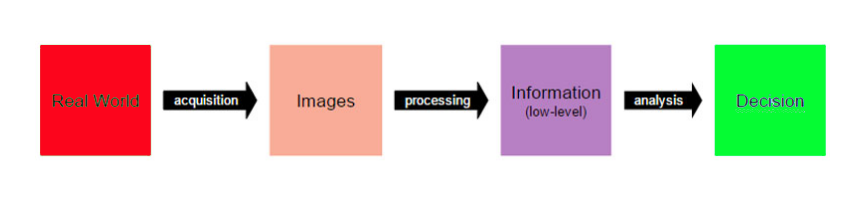
Using three basic component computer vision does it work with digital images.
Image acquisition
Image processing
Image analysis and understanding
The flow diagram of these process:


Let’s understand these three individually.

Image acquisition

Image acquisition is the process of translating the analog world around us into binary data composed of zeros and ones, interpreted as digital images.
In the process of image acquisition we convert the analog image into binary data which composed it into 0’s and 1’s, like digital images.
For this process different tools have been used
Like webcam, digital camera, modern DSLR, 3D cameras, laser related camers.


Image processing

In the part of image processing, image is changed into geometrical element to build and show the basic structure of the images or object using low level processing. For basic understand if you used the PHOTOSHOP you did this work many time using different option on it. We used this effect on our images but we don’t know about them. Actually these  happened on it using advance mathematical algorithm and the images processing effect.
Few of these techniques are:
1. Edge detection
2. Segmentation
3. Classification
4. Feature detection and matching

Edge detection
Segmentation

Classification
Feature detection and matching


Image analysis and understanding

Computer vision last step is identify the object from data, where machine finally take the decision in term of output using advance algorithm. The step complete their work using previous steps (image date, and low level information).
High-level image analysis are:
1. 3D scene mapping
2. Object recognition
3. Object tracking

3D scene mapping

Object recognition

Object tracking


Applications of computer vision

In the field of computer science, AI, robotics, human-computer interaction and images visualization different application are doing their work, few of are:

Horizon with Computer Vision 
Diseases identification using Computer vision
Image restoration such as denoising
Computer Vision on the Horizon
Motion recognition

Computer Vision in Industrial Preventative Maintenance
Augmented reality
Autonomous cars


Thanks for reading, I am hopeful it is very informative for you. It's also good thing for you after ready to attempt the quiz, TRY IT TO UNDERSTAND YOU KNOWLEDGE. Do and understand about your knowledge.


Well Come to Quiz

WellCome to Quiz :)
Comptuer vision means?
Computer see as like human
Computer behave as like human
Computer work as like human
Computer vision is derived from AI
False
True
None of them
How many component are using in Comptuer vision?
1
3
5
In which component analog world convert into digital images?
Image acquisition with pixel
Image acquisition
Image processing
Original image convert into geometical shape using?
Image processing
Image acquisition
Image acquisition with pixel
Identification of images using?
Image analysis and understanding
Image analysis
Image acquisition with pixel
In which software we can use different option which is related to computer vision?
Combo
Virtual effect
Photoshop
which is not the example of computer vision application?
Autonomous cars
Robotic
Motion recognition
which is the example of computer vision application?
Machine learning
Deep learing
Autonomous cars
Classification is used to identify the character from image?
True
False
None of them
Result....